Algebra Solver with Steps: How to See the Full Working
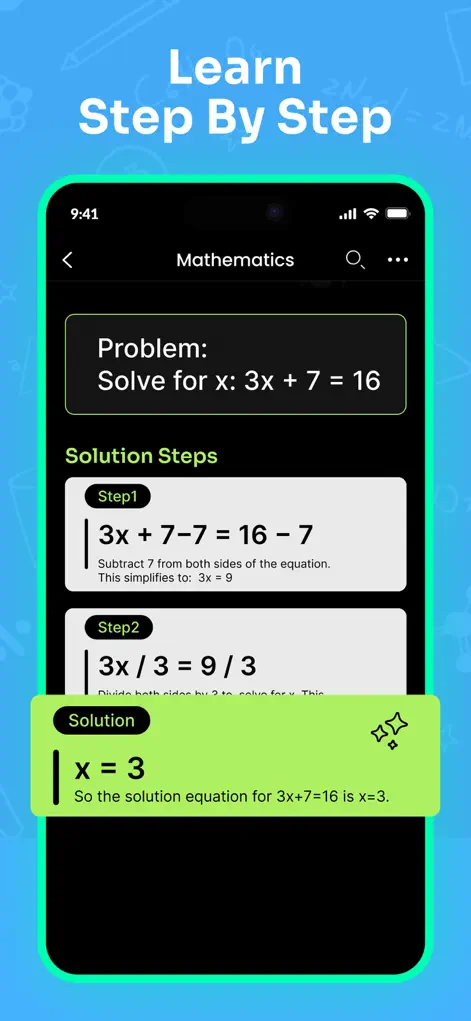
The answer to an algebra problem is worth one point on one worksheet. The method is worth every similar problem on the exam. That's why an algebra solver with steps beats an answer key: Math Solver shows the complete working — every transformation from the original equation to x = whatever — so you can learn the route, not just the destination.
Why steps matter more than answers
Teachers grade working, exams demand it, and — more practically — you can't reuse an answer, but you can reuse a method. Math Solver breaks each solution into clear, manageable stages: isolating terms, factoring, applying the quadratic formula, checking solutions. Follow the chain once and the next problem of the same type stops being hard.
Step-by-Step: Algebra Solver with Steps: How to See the Full Working
- Scan or type the equation. Camera scan for textbook problems, or type it directly for quick checks.
- Read the solution top to bottom. Each stage shows what was done and what the equation looks like afterward — spot exactly where your own attempt diverged.
- Interrogate the confusing step. Ask the AI tutor why a step works ('why did the sign flip?') and get an explanation at your level.
- Re-solve it yourself. Close the solution and redo the problem on paper. If you can reproduce the steps, you've actually learned it.
Where the step-by-step solver helps, and where to slow down
The solver is strongest on the algebra most courses cover: linear and quadratic equations, systems, inequalities, factoring and simplifying. These topics have well-defined methods, so the steps are easy to follow and compare with your own.
Take more care when a question names a method, such as solving by completing the square, and the app used the quadratic formula instead. The answer may match while the working your teacher expects does not. Ask the AI tutor to show the method the question asks for.
No solver is right every time. If an answer looks odd, substitute it back into the original equation. If the two sides don't come out equal, re-check the recognized equation and then the step where the numbers changed.
Common algebra slips the steps help you catch
Most marks lost in algebra come from a few recurring errors rather than big misunderstandings. When you compare your work with the app's, look for these first.
- Dropping a negative sign when expanding brackets, especially with a minus in front of the bracket.
- Forgetting to flip the inequality sign after multiplying or dividing by a negative number.
- Dividing both sides by a variable and losing a solution such as x = 0.
- Keeping only the positive root after taking a square root.
- Squaring both sides and not checking for extra solutions that fail the original equation.
Try It on Your Next Assignment
Math Solver: AI Homework Helper is free to download on the App Store. Scan your first problem in seconds.
⬇ Download Math SolverFrequently Asked Questions
What kinds of algebra can it solve?
Linear and quadratic equations, systems, inequalities, factoring, simplification — through high school and early college material.
Does it explain WHY each step happens?
The steps show each transformation, and the AI tutor answers follow-up questions about the reasoning behind any of them.
Is using a step solver cheating?
Used to check and understand your own work, it's a study tool — the same role a tutor or worked textbook example plays. Copying answers without reading the steps helps nobody, least of all at exam time.