Grammar Checker for Student Papers
You can lose a letter grade to errors that have nothing to do with your ideas: a plural that should be singular, a comma splice, the word 'informations'. A grammar checker is the cheapest grade insurance there is — one pass before submission catches the mistakes your tired eyes skip.
Why your own proofreading isn't enough
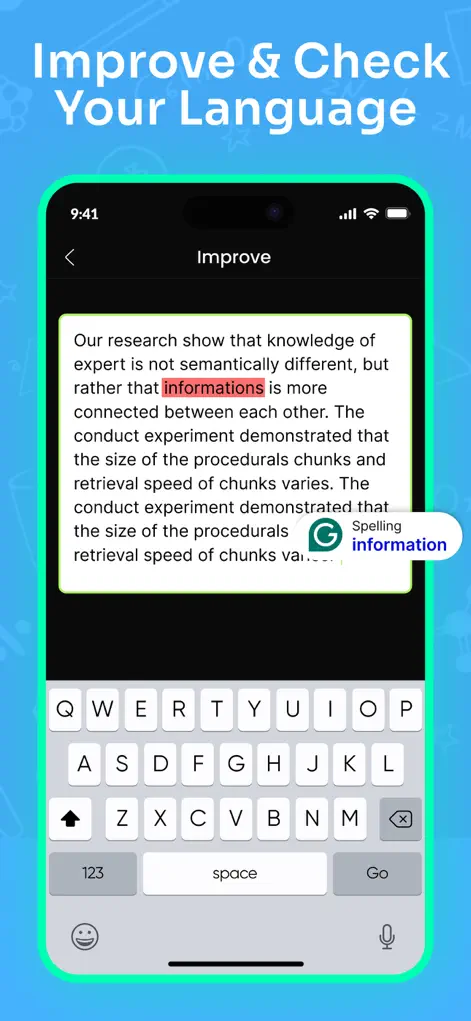
You wrote it, so your brain reads what you meant, not what's on the page — that's why self-proofreading fails predictably. Math Solver's language tools read what's actually there: spelling errors get flagged with corrections (like 'informations' → 'information'), grammar slips get inline suggestions, and vocabulary upgrades are offered where wording is weak. You accept or reject each change, which doubles as a micro-lesson.
Step-by-Step: Grammar Checker for Student Papers
- Paste or type your text. Bring in the essay, report, or answer you're about to submit.
- Review each flagged issue. Errors are highlighted with the suggested fix — read why, don't just tap accept.
- Upgrade the wording. Beyond errors, accept vocabulary suggestions where they say what you meant more precisely — and skip the ones that don't sound like you.
- Do a final read-aloud. After corrections, read the piece aloud once; anything that trips your tongue still needs a human fix.
What a grammar checker catches, and what it misses
Spelling mistakes, agreement errors, wrong word forms and clumsy phrasing are the checker's home ground. These are exactly the slips that are hardest to see in your own writing.
It is less reliable on meaning. A sentence can be grammatically perfect and still say the wrong thing, contradict your previous paragraph or misstate a source. Names, technical terms and quotations may be flagged when they are correct, so never change the wording inside a quotation to satisfy the checker. Citation formatting such as MLA or APA is a separate job; follow your style guide for that.
If your teacher has rules about AI tools, check that a grammar checker is allowed, especially for timed or in-class work.
A proofreading order that saves time
Fix big problems before small ones. There is no point polishing commas in a paragraph you are about to delete. If you can, leave a gap between finishing the draft and proofreading it, even an hour, so you read what is on the page rather than what you remember writing.
Then work through the draft in this order, one pass per item. Trying to catch everything in a single read is how errors slip through.
- Structure: does each paragraph make one point, and do they follow a logical order?
- Clarity: cut sentences that repeat an earlier point and split any that run past three lines.
- Grammar check: go through each flagged issue and accept only fixes you understand.
- Consistency: tense, US or UK spelling, capitalization of key terms and number formats.
- Formatting: title, headings, citations and the word count the assignment requires.
Try It on Your Next Assignment
Math Solver: AI Homework Helper is free to download on the App Store. Scan your first problem in seconds.
⬇ Download Math SolverFrequently Asked Questions
What errors does it catch?
Spelling, grammar, and awkward or weak wording — with inline suggestions you approve one by one.
Does it improve vocabulary too?
Yes, it proposes stronger or more precise word choices suitable for academic writing.
Will it change my writing style?
Only as much as you let it — every suggestion is opt-in, so your voice stays yours.